
Reconciliation
Check that every statement balances, read the verdicts, and fix a cycle that doesn't tie out.
A financial statement is only worth building on if you can trust that it is complete. Reconciliation is how CounselPro earns that trust. For every account, in every billing cycle, it checks the one equation a real statement has to satisfy: the beginning balance, plus everything that moved that cycle, equals the ending balance the bank printed. When that holds, the cycle is sound. When it does not, CounselPro flags it so you can settle it against the source.
That quiet check does a lot of work in a case. An off cycle is a lead. Most of the time it means something mechanical: a transaction was read twice, one is missing, a page never made it into the upload, or a balance was mis-keyed on the way in. You fix those against the statement and move on. But the cycles that survive that review are the ones worth your attention. A balance that does not match its own activity, an account that will not add up, money you cannot place, that is the thread you pull in discovery or a deposition.
It also protects your own work. Before you put a number in a filing or hand it to a judge, reconciliation tells you the data underneath it holds together. Opposing counsel cannot unravel your analysis by finding the one transaction you missed, because you already found it. Run it first, clear the flags, and everything downstream stands on ground you have checked.
Where do I find reconciliation?
Open your project, click the Insights tab, then Reconciliation. The heading reads "Reconciliation," and under it: "Whether each statement's printed balances tie out to its transactions, cycle by cycle." There is nothing to generate first. It reads from the statements already in the project.
Note
Reconciliation is part of the Premier plan and every single project. On Core and Plus the same tab reads Statement cycles. It lists every cycle and lets you open each one beside its statement pages, but it shows no verdict, no balances, and no gap. See whether reconciliation is in your plan.
What do the reconciliation verdicts mean?
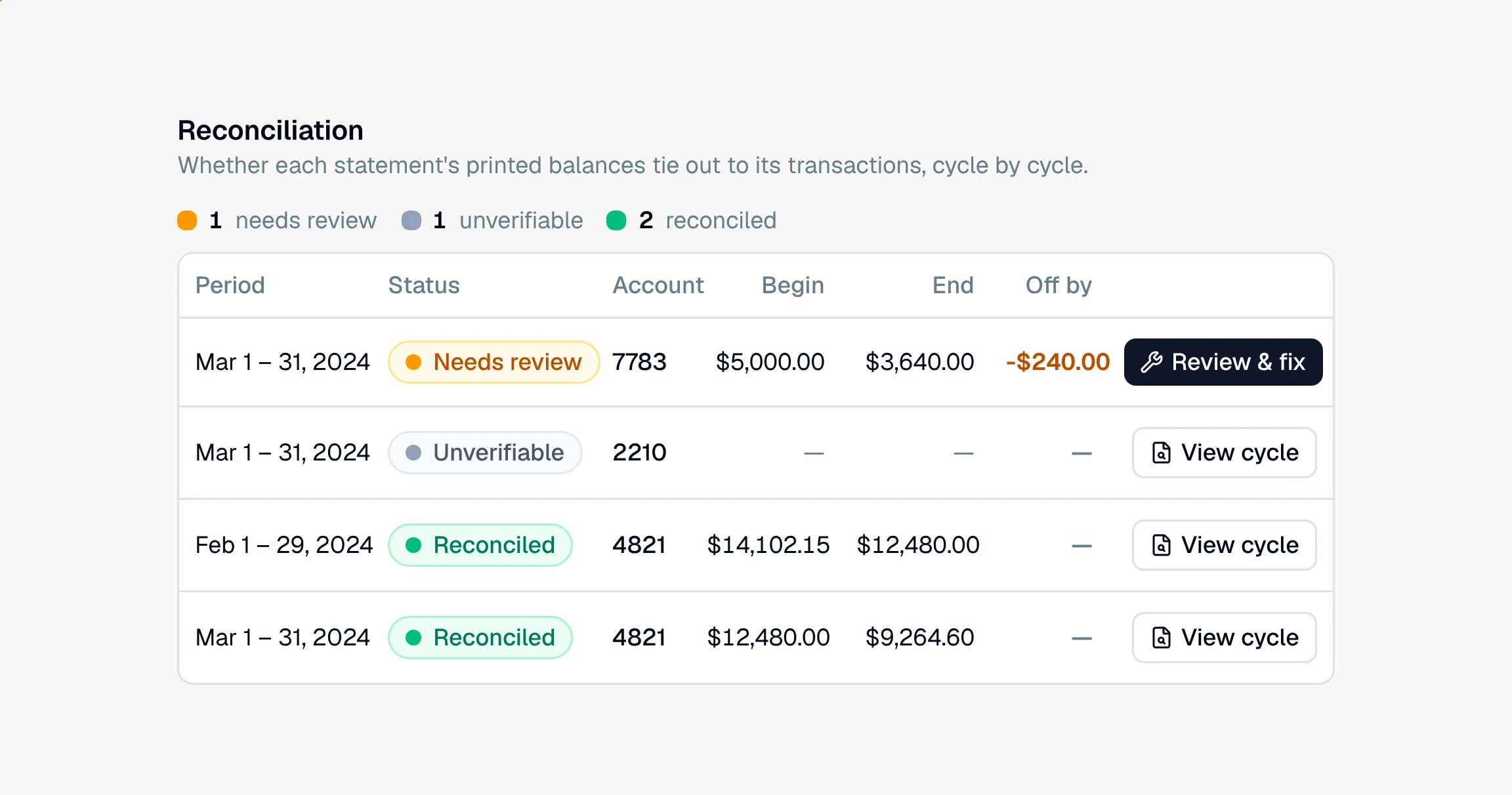
The tab is one table with a row for each account in each billing cycle. Every row carries one of four verdicts:
Reconciled (green). The beginning balance, the transactions, and the ending balance all agree. Nothing to do.
Needs review (amber). The numbers do not tie out. The cycle is off by some amount, and it is waiting for you to review and fix it.
Unverifiable (slate). The statement printed no beginning or ending balance to check against, so there is nothing to reconcile.
Not checked (gray). An older statement that was processed before reconciliation ran. Reprocess it to get a verdict.
At the top, a tally counts the rows at each verdict. Click a count to show only those rows, and click it again to show them all. The rows that need a human sit at the top of the table, so the work finds you instead of the other way around: needs review first, then unverifiable, then not checked, then reconciled. Inside each of those groups the rows run in calendar order, oldest period first.
How do I read a cycle?
Each row is one account in one cycle, read left to right:
Period, the dates the cycle covers.
Status, the verdict for that account in that cycle.
Account, with its type beside it.
Begin and End, the balances the statement printed. A dash means it printed none.
Off by, how far the account misses, with a plus or minus for the direction. It is blank when the account ties out.
Statement, the file the cycle came from.
Click a column header to sort by it, or type in the search box to narrow the table by account, date, or file name.
A row that needs review carries a Review & fix button. Every other row carries View cycle, so you can still open a cycle that reconciled beside its statement pages and check the engine's work. Either button, or a click anywhere on the row, opens the same review workspace.
What does it mean when a cycle doesn't balance?
Start with the ordinary explanations, because most off cycles are one of them: a charge or deposit got read twice, a row is missing, a page didn't make it into the upload, or a balance was mis-keyed. You open the cycle, compare it against the statement PDF, and correct it. As you do, the gap updates until the cycle ties out. That is covered step by step in how to review and fix a cycle.
The cycles that stay off after you have ruled all of that out are the ones that matter. A printed balance that does not match the account's own activity raises a real question: where did that money come from, or where did it go, and why did the statement not account for it. Those are worth a note for discovery.
The colors here match the coverage grid, so an amber cycle is the same "needs review" you see on that month's cell, and a click on that cell opens the cycle. The project Overview shows the share of months that reconciled. Reconciliation catches money that does not add up; coverage catches whole months that are missing. Between them you can say whether a set of records is both present and internally consistent.
How do I use reconciliation to check a client's records?
Treat it as the first pass over any project before you draw conclusions from the numbers:
Let it run and read the tally. It reconciles from the statements already in the project, so the tally at the top tells you at a glance how much of the record is solid and how much needs a human.
Work the flagged cycles top to bottom. They are already sorted to the top. Open each one, compare it to the source, and fix the mechanical errors so the gap closes.
Flag what will not tie out. When a cycle is right and still off, that is your lead. Note the account, the cycle, and the amount, and carry it into your questions for the other side.
Then build on it. Once the flags are cleared, the insights, Daystrom, and any report you generate all rest on data you have already verified.