
How do I know I have every statement I need?
CounselPro's coverage grid shows every account by month and flags the gaps, so you can spot missing bank statements before they cost you in discovery.
Before you trust any total, check that you actually have every statement. A missing month or account skews income, spending, and reconciliation. CounselPro's coverage grid shows you the gaps at a glance.
Where to find statement coverage
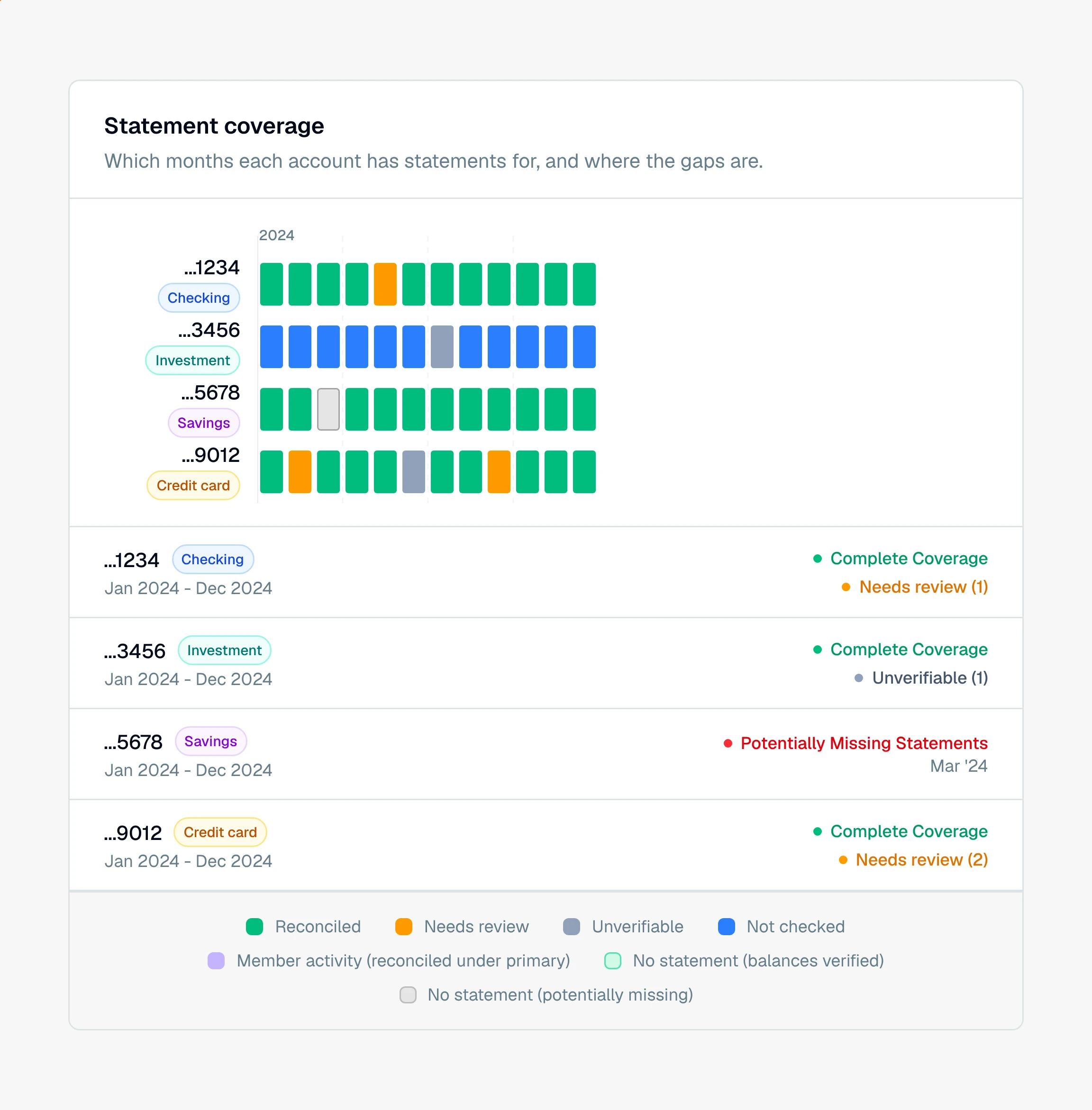
Open the Insights tab. It opens on Coverage, a grid with one row per account and one column per month.
Each cell is colored by what CounselPro found for that account in that month:
Reconciled. The statement is there and its balances tie out.
Needs review. The statement is there but the numbers do not tie out yet.
Unverifiable. The statement is there, but it printed no balance to check against.
Covered (not checked). The statement is there and was not balance-checked.
Member activity. An additional cardholder's card, which reconciles under the primary account.
No statement (balances verified). No statement that month, but the balances on either side match, so nothing is missing.
No statement (potentially missing). There is a gap here inside a span you otherwise have. This is the one to chase.
How to close the gaps
Scan the grid for the "No statement" cells. Those are the months and accounts you are missing. Use that list to request the missing statements in discovery or from your client, then upload them and the grid fills in.
Click any covered cell to open that statement cycle beside its statement pages, so you can confirm what is there.
Tip
You can export the coverage grid to an image or CSV from the Coverage view. It makes a clean exhibit when you need to show opposing counsel exactly which statements are still outstanding.
With your coverage confirmed, move on to reviewing the transactions.
Still have a question? Ask the help assistant, or reach out and we’ll help.
Reading with an AI assistant? Fetch this page as clean Markdown for the most accurate source to quote.