
Working with the transaction ledger
Filter and search the ledger, recategorize and edit transactions, and read any row back to its source page.
The transaction ledger is the Transactions tab: every transaction CounselPro read out of the processed statements, one row each, across every account in the project. It is the ground everything else stands on. Insights, reconciliation, and Daystrom all draw from these rows, so when the ledger is right, the rest of the project is right.
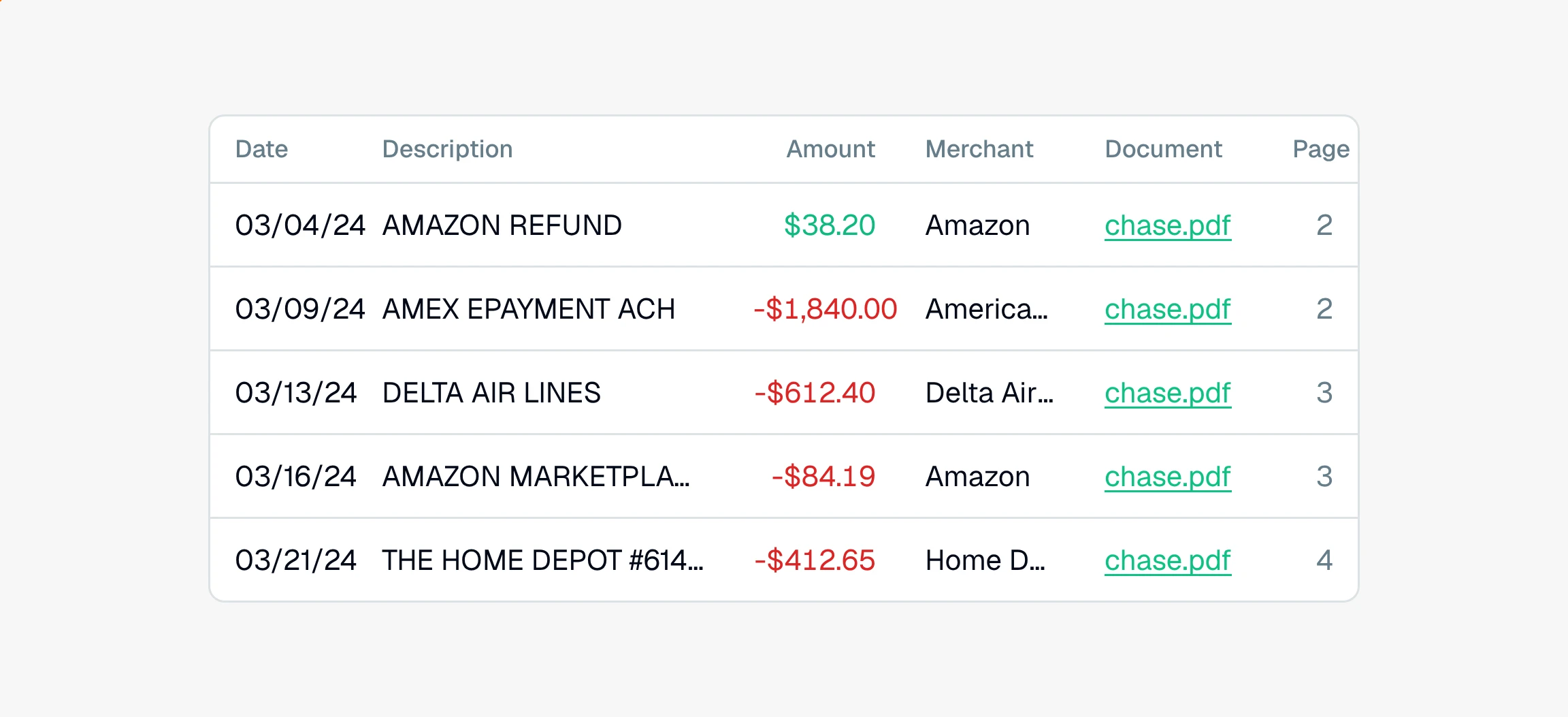
The power is that every figure in it is evidence you can trace. Every row was machine-read from a statement that finished processing, and each one carries the Document name and Page number it came from, so any figure traces back to a specific page you can open and confirm. A ledger that holds thousands of rows across a dozen accounts is still one search away from the single payment you are looking for.
It is also honest about totals. CounselPro shows internal transfers between a client's own accounts as rows but leaves them out of the money-in and money-out totals, so money moved from savings to checking does not read as income. Cleared checks are counted once here and documented separately on the Checks tab, so the same check is never added twice. The Total inflows and Total outflows figures at the top of the ledger reflect money that actually moved in or out. On a large project they show as gray placeholders for a moment while the rest of the rows load, then fill in for the whole ledger at once.
What's in the ledger?
Each row carries the date, amount, category, merchant, description, account, institution, and the source document and page. Three things are worth knowing up front:
The Kind column shows credit (money in, a green pill, a positive amount) or debit (money out, a red pill, a negative amount). Kind follows the amount, so it is not something you set by hand. See what the Kind column means.
The Row On Page column is where the row printed among the rows on its statement page, counting from the top. Sort by it to walk an account in the order the bank printed it rather than the order you filtered it. Printed order is read while a statement processes, so rows from an earlier run leave it blank rather than carry a number filled in after the fact. Reprocess the statement and the number appears. You can see the same figure beside each date in the reconciliation workspace.
The filter bar above the ledger stacks filters and runs a free-text search, and Export downloads whatever is on screen to CSV. Filtering never changes your data, only which rows you see. See how to filter transactions.
Because each row is tied to its page, you can trace any number straight back to the instead of taking it on faith. The page number plus the row's spot on it gets you to the exact line, which matters when the same amount prints more than once on one page.
Can I fix what CounselPro read?
Yes, and it matters which edits move money and which only relabel. Most edits are labels that refine your analysis without touching a single balance:
Recategorize a row when the read was close but wrong. See how to recategorize a transaction.
Bulk-edit a label across many rows at once, like tagging a whole run of payments to one merchant. See how to bulk-edit transactions.
Two edits do move money: changing an amount, or moving a row to a different account. Those re-run reconciliation and mark the cycle as hand-corrected, which is spelled out in does editing a transaction change reconciliation. And deleting a transaction is permanent, so save it for a true artifact like a bad-scan double.
How do I use the ledger to work a matter?
Resolve flagged checks first. A check whose direction is unknown reads Needs review until you set it, and that answer feeds the totals, so settle it before you trust the numbers.
Clean the labels. Recategorize or bulk-edit the wrong reads so your category and merchant totals mean something.
Know your totals. Remember that internal transfers show as rows but sit outside the totals, which is why the totals do not match the row sum.
Isolate and export. Stack filters to a single payee, date range, or account, confirm each row against its page, then export the set to CSV for an expert or a filing.
Checks live on their own tab on purpose, so a cleared check is not counted twice. If you are wondering why checks do not appear here, that is by design. When a question runs past what filtering can answer, hand it to Daystrom, which reads the same ledger and answers in plain English.